Monday, 16 January 2017

Procedural Website? - Part 2

Recap

In Part 1 we proposed using Apparance as a text processor and tool automation controller to build our web-site.  So, how exactly would we go building about this?
The Apparance web site prototype.

Page Structure

Browsing a few basic web tutorials on how to set up a fairly standard CSS styled HTML page we are looking at this:
  1. Title banner and logo
  2. Site navigation bar
  3. Page content, different for each page
  4. Footer with a few common links and note.
We can encapsulate the shared and custom element construction in a top-level page procedure.  This wraps a procedure for emitting the standard HTML page sections and any extra bits all pages need (metadata, etc).  This is the point that the CSS for the page and the body HTML are passed in as parameters.
The top-level page generation procedures.
This provides a single procedure that can be re-used on each site page, with the page specifics and customisations passed in as parameters.  For example, here it is used on the homepage.
All that is needed for a top level, text content based page.
All that is needed for a page like this is the content source and a couple of constant values.

Title

I wanted the title to use the Apparance logo, and have a background that hinted at both what you can make with Apparance, and how you make it.  This is a combination of background image banner and centred logo.
Title banner background (transparency shown as checker-board)
Title logo (transparency shown as checker-board)
Both of these are images that are prepared by hand (at the moment) and just need to be copied across if they are updated or missing, this is handled by the Image Fetch procedure (see below).
Header background (CSS) and logo (HTML) generating procedures
There is a bit of styling to apply the background, and the logo is an image HTML element over the top.

Navigation

The navigation bar should be a simple row of buttons with hover highlighting and current page indication.  These provide the top-level site choices, the leftmost one being the main homepage and site entry-point.
The main navigation bar.  Current tab and hover highlighting shown.
To do this properly, the idea is to have the items expressed in a simple a way as possible in the HTML and leave the funky appearance to the CSS.  The best of conventional wisdom points at using an un-ordered list (UL tag) with list items (LI tag) for each menu option.  With the appropriate tagging, this can then be 'skinned' into a row of buttons using only CSS.
Again, this can be a single procedure that gets re-used on each page.  In fact, some of the pages will require a second row of buttons to navigate sub-pages (too many pages to have them all in one row).  We can build this procedure (and the CSS) to support this.
The bar and button creation procedures.
The CSS generation procedure for the navigation bar and buttons.
The procedure to generate the CSS is designed to be applied twice, with the menu level as a parameter.  This allows the styling to be slightly different and provide a raked appearance to the menus as they transition into each other and the page content.
Example of a double level navigation bar.
To get the to show the correct selected page in each place it's used, the page it is on is passed as a parameter which causes that button to have the selection highlight styling applied.

Footer

The page footer is very simple, just a few links and some text.
Simple page footer
It is included in the general page procedure as it appears at the foot of every page.
Common footer procedure and where it fits in.
We may need to include some customisation later so that when on pages it actually links to, those links are disabled (for neatness).  There are other cool things we could do with the footer later I'm sure.

Content

Markdown

The main part of every page is the content and comes, for most of them, from external markdown files.  This allows the content to be written in a form that can be transformed into HTML as well as other forms if we need (see later).  Here is an example of what the content looks like in raw markdown and on the actual page.
Markdown source document compared to resulting HTML page output.

Custom

Some pages warrant custom generation and rely on special procedures to generate their content.  A good example of this is with the online user documentation pages I want to include.  Here, instead of hand-writing simple textual descriptions to appear on the Operators manual page, we can build it automatically from the operator definitions that the editor already dumps out on start-up (a simple form of user doc that was added ages ago).  This is in the following form:
Source operator description format generated by the editor
By loading this in with the file read operator, applying some recursive scanning of the content (using find and split operators to parse each section), we can generate web page content for it.  With some HTML table and a sprinkle of CSS magic we can generate fairly good facsimiles of the actual operators in the editor.
Resulting operator documentation example
These have hover-tips for extra detail where available, such as the internal operator name and the IO connection descriptions.  There is also a summary section that appears at the top of the page with links to each section.
Summary section for the operator documentation

Code Generation

The page construction process is broken down into various modular parts, split between the HTML generation and the CSS generation as well as being split into generic (re-usable) operations and ones specific to our site or page.
I've found that by wrapping even the simplest tags with procedures, it keeps the graphs readable, and also allows for site-wide fixes and additions to any of the HTML or CSS constructs.
It's even worth wrapping the simplest of tags.
Most code output (CSS or HTML) is actually just text string concatenation, for example, the heading tag just prepends the opening tag and appends the closing tag:
The heading procedure, parameterised by level (and ID)

HTML & CSS

A library of HTML element procedures and CSS constructs have been accumulated as the site constructed.
Reusable HTML and CSS procedures
The HTML ones are mainly for the tag types that can be used, with a few attribute types to help build them.  The CSS ones are containers for the styling of each section, and a load of property helpers.  Here you can see them in use on the common content styling:
CSS property helpers in use 

Procedures

Some of the re-usable building blocks, specifically for handling files are described in more detail here.

Image Fetch

Using the new file operators, the paths can be prepared, the timestamps checked, and the copy performed if required.  On success we pass out the relative path to the image file, ready for use in the HTML or CSS code.
Image fetching procedures.

Document Read

The markdown documents are read in by invoking Pandoc with the source file as a parameter and accumulating the text output by it to the console stream.  If the return value indicates an error we report a suitable error message.
Document reading and processing procedures.
Some additional document processing is done here to achieve two things:
  1. Image tags are parsed and used to drive image thumbnail generation, propagate the main file, and replace the image element with the thumbnail and a link to the full image.
  2. Lists have a little bit of formatting added to turn "Title - Description…" into "Title - Description…" to make the headings stand out a bit more.  This is styled and can be updated globally.

Thumbnail Generation

Where image tags are included in any content the processing step applied on load (if enabled) generates the thumbnail automatically.  There are a number of things going on here.
Processing of all image tags in the document using recursion
  1. The document is searched (using recursion) for all image tags.
  2. The tag is parsed and broken open into its constituants.
  3. The image file is located and propagated to the output folder.
  4. A name for the thumbnail is generated based on the image name.
  5. A thumbnail version of the image is generated in the output folder (using Image Magick).
  6. A new image tag is constructed (around the thumbnail file).
  7. The image tag is wrapped in a hyperlink tag pointing at the full image.
  8. The document around the image tag is re-combined.

There is a lot going on here, but it can all be laid out nicely and the flow of information is clear from the procedure construction.

Viewing the Results

Now we have this all up and running, as changes are made to the procedures the top-level page procedure we are 'viewing' is re-built for us.  This is an HTML page with the required images nearby that can readily be viewed in a browser.

Live Page

One additional requirement to be able to see changes in real-time is for us to get the browser to refresh as pages change.  This could be done with the auto-refresh timer you can add to a web page, but this is rather crude as it will a) be updating all the time, and b) have to be doing so rapidly to get a decent response time to changes.
A bit of digging turned up a lovely little Chrome extension called LivePage.  After setting a few options up, you can click on the icon alongside any page and have it watch the source file for changes.  On detecting one the page is reloaded.
LivePage browser extension in Chrome
It is proving really good for working interactively and has options to track changes to HTML, embedded CSS, and even source image files (experimental, but seems good).

Content

By adding a quick directory watcher feature into the editor I was able to also have generation happen when the source content (markdown) documents or source images changed.  This nicely rounded off the editing experience.

Interaction Examples

The best way to see all this working together is a video, so here you are.


So far this has been a really fun way to develop the web site, and I'm certainly going to continue along this vein.  I hope you liked this slightly tangential application of the technology, I expect there will be more of this sort of thing in the future.

Next

Next time I should be ready to give you an update on height work on Future City and a long overdue engine feature I added to help support it.

Monday, 9 January 2017

Procedural Website? - Part 1

Web Site Needed

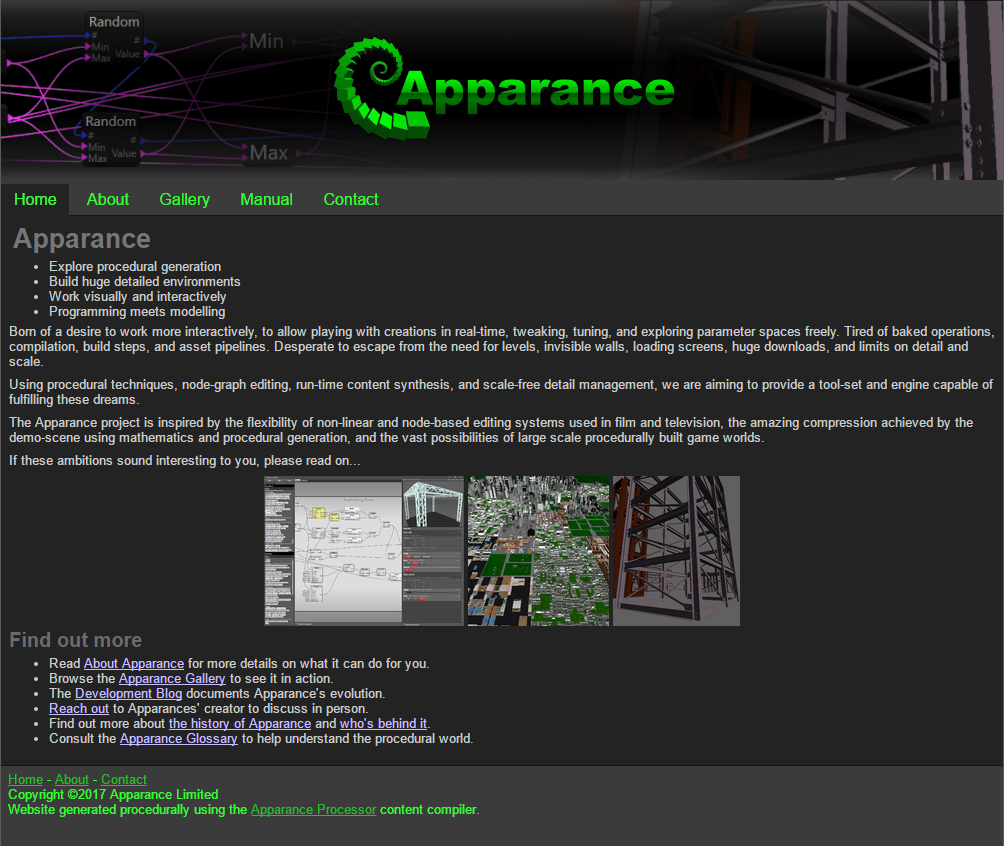
Apparance is at the stage now where it needs a proper web-site to bring together all the information accumulating around the project and provide a hub for people to find out all about it.  It's going to need all the usual stuff; summary pages, a gallery, detailed project information, feature lists, technical information, contact information, blog, documentation, and contact information.  Something like this:
A prototype Apparance homepage.
There are many ways to approach creating a web site.  It could be out-sourced, built using an online web-site maker, using offline tools, crafting from the many kits and examples available, or writing it all by hand in notepad.
Not having huge resources available and having hand crafted a few pages in my time I figured it would be best, at least in the short term to code it up myself.  So, given that I'm 'living and breathing procedural' right now, is there any reason not to try and do this procedurally, with Apparance?
I can't see anyone else making websites procedurally!  Am I crazy?

Approach

I'm not familiar with all that is trendy in web development and I'd like to keep things simple so I'm thinking static HTML pages with CSS styling.  I'd like to be able to author page content in some sort of simple format and not have to be editing html or using any web design tools to make changes.  Any image manipulation should preferably be handled automatically or with little interaction. Given this, some process will be needed to effectively compile the content, images, structure, and styling together into each page.

Utilities

Content Processing

Simple format text files with basic formatting information you say?  Sounds like mark-down to me.  A bit of digging found a rather impressive command line utility called Pandoc which actually will convert a plethora of document formats.  By default though passing in simple markdown text it will spit out an HTML fragment.
Pandoc, by default converts markdown into HTML
Perfect for injecting into the structure needed around it to form a complete page.

Image Processing

The most common need for image preparation on a web page has to be scaling to generate thumbnail previews, something we're going to need to show off all the visual goodness of Apparance.  A well know tool that handles this adequately is Image Magick.  Again a command line tools with a huge number of features and functions, it comes with an command specifically designed for generating thumbnails.
Image Magick, great for quickly handling thumbnail generation
Perfect to add to the arsenal of tools for building my pages.

Automation

Now to the question of automation; how best to take all this and build pages out of it?  Let's look at the requirements.
  1. Generate the common page HTML and CSS according to the page design.
  2. Launch Pandoc to turn the page content into HTML.
  3. Launch Image Magick to generate thumbnails for the images.
  4. Combine the HTML into pages.
  5. Assemble it all in a suitable file/folder structure for serving as a web-site.

Doing it wrong

There are existing static web page compilers available (e.g. Hugo) I could use.  I could write a program to do it, or come up with something in python or similar scripting languages.  But thinking about Apparance and some of the philosophies behind it I realised that these approaches went against it on several levels.
First, there was the baking process, the page needed to be compiled before it could be viewed.  Now, whilst any process of assembling a page requires time to complete, with scripts and command line tools there are still several steps involved in getting from making a change to seeing the results.  You lose the immediacy of a truly interactive editing experience.
Second, committing anything to script or code goes against the data-driven approach, and again, you lose the direct connection between your design and the results.

We've seen this before

Having already worked on interactive editing and text based processing with the material and shader system in Apparance it seemed like a similar approach could be applied here.  Why not use procedures in Apparance to handle the HTML composition, the control of command line utilities, and the manipulation of files and the directory structure?  It would mean any part of the web-site could be editing and you would get to see the results in real-time!  This was clearly the path to follow.

And So; To Procedural

A few things would be needed to be added to Apparance's capabilities for us to be able to support this though:
  1. Extra string handling functions - we are going to be doing more fancy things than we did with shader building.
  2. File handling operations - we are actually going outside the application, to work with files.
  3. An operator for spawning processes and collecting their output - to allow us to use other tools to do our bidding.
With all this in place, we are in a position to start building the site by creating procedures and letting Apparance do the work.  Next time we'll have a look at how this went and what it's like to work with.  Here's a sneak peek at the editor with the procedure for writing out the HTML pages.
Procedure to write out an HTML page

Tuesday, 13 December 2016

Future City: Update 10 - Progress Gallery

Not many words today, just a quick rundown of the new and improved aspects of the city.

Aerospace

A quick space-port/airport cobbled together from other city parts to just get rid of the last placeholder zones.
First pass aerospace district, the black will be landing areas for ships.

Parks

Time for some low level detailing, quickly knocked up and assembled a variety of simple small-scale park features; benches, bins, flowerbeds, huts, and a stepped plinth.  I even added a simple tree model that can be refined later.
Parks and recreation, now with 'furniture'
More green space in our cities

City Green Spaces

Plugging the park 'furniture' into the business district open spaces instantly improved the sense of scale.
Business district park areas, a nice spot for lunch
Adding a sense of scale to the large skyscrapers

Residential

My multi-celled apartment complexes and various street/terrace configurations lends to a nice residential area feel.
Residential areas, lots of apartments, terraces, and streets
Example street layout, with variable back-yard spaces

Detail Boost

Some time spent tweaking parameters and diagnosing detail problems has seen a nice boost in detail levels, meaning we can start to see the promise of the system even more.
Overview of various city zone types, now in even more detail
10 kilometres of city in view from on high

Next

Now I'm finally going to get on to height variation and simple terrain modelling for the surroundings and green areas of the city…

Sunday, 4 December 2016

A Case Of Non-Randomness - Part 2

The Problem

I was just starting to set up the procedures needed for rows of buildings when I hit a problem.
Bad randomness showing up in row of buildings
These are supposed to be random heights!  I've had a nagging feeling that my random number generation operators weren't working properly and had noticed a few artefacts before, but dismissed them as me being overly sensitive to patterns.  This horrible patterning however tipped me over the edge and I had to investigate.

Visualisation

A great way to sanity check random numbers is to visualise a sequence as a grid of intensity values (see Runes blog post again).  So I put together a couple of nested procedures to build a 2D grid of tiles, each coloured black-to-white according to the random function under scrutiny.
Random number sequence visualisation using geometry
This instantly revealed unpleasant patterns in the number sequences.  Trying different seeds showed that most of them seemed to have regular repeating pattern or clearly be restricted to lower or upper value ranges.
Bad patterning in the random number generation

Investigation

My first avenue of investigation was to reproduce the algorithm explicitly in the test procedure using the same sequence of operations as the random generation library code.
Explicitly implemented random number generator
I hoped that this would allow me to play with the algorithm to find the bug.  However, this version produced very nice random values, with no discernible patterns.  Carefully picking through the implementation I couldn't see any functional difference.
Next I added numerical display of the seed and value for each tile and zooming in on the start of the first row I noticed that they did agree for a few values, before diverging.  This seemed to coincide with the seed (handled as a signed integer) going negative.  I wasn't sure how this would affect the algorithm though so I switched to debug build and stepped through the for this case.
After some debugging runs and breaking open the algorithms a bit I discovered what was going on.

Cause

My entropy extraction macro (see Hash part of Random Value Generation Process in the previous article) uses right shift operations >> to re-align the overlapping bits, but I had forgotten that this will perform a sign extended shift if the operand is a signed value.  That is, if the most significant bit is 1, indicating a negative number, then 1's are shifted in instead of 0's.  This situation caused the extraction algorithm to XOR chunks of 1's into the seed values.  XOR has the interesting (and normally useful) property that successive applications of 1's causes toggling.  This fact combined with shifts used set up a repeating oscillation in some chunks of bits.  It was completely believable that this could produce the heavily striped and range limited results I was seeing.

Fix

The fix here was relatively straight forward as the behaviour of >> on unsigned integers always shifts in zeros into the upper bits, as was actually required.  Interestingly, the reason we didn't see this problem on the explicit implementation was that I had made sure the shift operation always used the unsigned shift.
Casting the operands to unsigned integer prior to each shift fixed this and the two implementations now agreed, AND also produced the randomness they were designed to generate.
Much better random sequences

Slight Red Herring

Going back to the building height problem I discovered that this hadn't fixed it, the result was exactly the same!  So, I had managed to find and fix a real problem, just not the one that was causing my issue.  Oops!

The Real Culprit

Checking the building height calculation I realised that I was relying on the variant parameterisation of the Random Twist operator to generate random values from the building index along the row.  The reason it was designed to work like this is that I needed a way to generate unique seeds for each building from the single seed provided to the row as a whole.  The only distinguishing information the buildings have at this point where they are in the row, i.e. their index.  The twist operation seemed to be perfect here as the variant input was intended for exactly this sort of operation.
Using twist variant input to derive per plot variation in a row of houses
Unfortunately this didn't seem to produce very good results for a sequence of successive variant values.  Adding a visualisation of the twist operation with the tile index driving the variation input again showed up this lack of randomness.
Patterning from the Random Twist operator
In hindsight this is one of the issues Rune talks about in his article; close or sequential seeds don't necessarily produce sequences that are very random relative to each other.  He suggests a decent hash of the input to better seed the sequences.

A Better Twist

This time the patterning wasn't as strong, but it was certainly there.  Looking into the Twist implementation I realised the mixing method of the variant value was far too simplistic and I was relying on small changes in variant input to produce significant changes to the output seed and hence number sequence.  This was obviously not the case and I needed a better mixer.
// jump to another point in the
// random stream (parameterised)
int Random::Twist( int input, int variant ) 
{ 
  return Random::Algorithm::Next_LCG_ANSIC( input^variant ); 
}
After some research, I realised that the property I was after is referred to as 'avalanche', i.e. where small input changes cause large output changes, and was a common desirable feature of hashing algorithms.  Again, rather than investigate and implement my own solution I chose a publicly available integer hashing function that claimed very good avalanche characteristics.
Replacing the mixer generation with this in the Twist operator proved very successful and finally achieved a good random variants again.
Much improved twist variant output

Fixed Buildings

Going back to my row of buildings again, with the above changes produced much, much more satisfactory results.
That's much better
I expect to see improvements throughout my projects as a result of these fixes, some will be more subtle than others.  I'm glad I took the time to investigate this as it's resolved a niggle that I couldn't quite put my finger on.


Epilogue

Procedural generation is typically required to be completely deterministic so that, for example, every time you re-visit a game the world is familiar to you, or that every player of a game sees the same world.  This is an important feature of a game such as No Man's Sky, a vast, hugely varied procedural universe that is the same for every player.
Fixing the bugs in my random number generation operators means I have changed the behaviour of something fundamental to all the generation processes across my projects.  This in turn means that all the content they generate will now be different, the content they generated before has been lost.  Forever.
The deterministic nature of the processes involved in procedural generation, combined with their complexity means they are hugely susceptible to the butterfly effect, that small changes to any part (all parts are effectively inputs) can have huge effects on the output.
I have often wondered how many times Hello Games has made changes to No Man's Sky that have completely invalidated the current universe it is set in.  How many versions of universe have they gone through to get to the one we play?  I dread to think how much of a problem this is for ongoing work where they can't change or even fix bugs in so much of the game for fear of breaking the universe.

“There is a theory which states that if ever anyone discovers exactly what the universe is for and why it is here, it will instantly disappear and be replaced by something even more bizarre and inexplicable."
"There is another theory which states that this has already happened.”
- Douglas Adams, The Restaurant at the End of the Universe

Monday, 28 November 2016

A Case Of Non-Randomness - Part 1

In preparation for a post about a randomness bug I found, let's look at some of what's going on behind the scenes in Apparance with random number generation, propagation, and manipulation.

Premise

The random number generation in Apparance is based on two main principals:
  1. Generating a repeatable sequence of random values.
  2. Branching of random number sequences.
These are embodied in two operators you can build into your procedures, the "Random Value" operator (with Float and Integer variants), and the "Random Twist" operator.
The two Random Value operators and the Random Twist operator
Both take a seed* value as input and produce a new seed value as an output.  The Value operators also take Range inputs and produce a Value output.  Seeds are signed (32 bit) integers and so are compatible with the normal integer connection type.
The Value operators are fairly self-explanatory but the need for the Twist operation will be explained further down.
* I've adopted the convention of using the # symbol at the end of an input or output name to indicate a seed value. 

Random Sequences

When a procedure needs some variation, it will usually be parameterised by a seed value such that it can be recreated in exactly the same way by providing the same seed, or different versions of it created by providing different seed values to each instance.
Seeding a procedure.  Same seed; same output, different seed; different output.

Within the procedure, where multiple values may be needed, these can be obtained by calculating a sequence of random numbers from the given starting seed.  Each Random Value operator takes its seed from the seed output of the previous one.  This way each operation is provided with a different seed from which to generate its output value.
Generating multiple values within a procedure

Multiple Seeds

If you want to create a collection of similar, but varying, objects you would need to instance one procedure multiple times, each with a different seed.  So, how do you generate these seeds?
A simple approach would be to just use the same random generation sequence the Random Value operator uses to get each new seed (discarding the values they also generates).  However, there is a big problem with doing this; if internally your procedure uses several random values from the random sequence, the set for each instance can overlap to some extent.  
The problem with using a single random number generator; a rolling pattern of values
If the values in the procedure are used to drive a similar aspect of the output, e.g. the heights of several sub-elements, then you will see similarities between instances where there should be none.  This may be hidden by the exact nature of a scenario, but there are plenty of cases where this will be horribly noticeable.
Wiring up an instancing example using the procedural symbols from my Proc-jam game and using the normal random operator to generate the seeds we can investigate this effect.
Investigating simple seed sequence generation problems
As the set of symbols within the instance procedure is also created using from the normal random generation operator, the symbols displayed are a window into the LCG sequence, each one shifted along by one value.
Symbol sequence with sequential seeds from same generator showing the 'windowing' effect
The solution here needs some consideration of how random sequences are generated and what a seed is.

Generation Algorithms

The sequence of values produced by a random number generator come from the random number generation algorithm it employs.  The seed is used to set up the internal state of the generator, and each time a random number is generated, the internal state changes ready to provide the next one.  The algorithm is responsible for ensuring that the output is perceived as random.  There are a huge variety of algorithms people have devised, each with different characteristics of randomness, speed, size (internal state), and cryptographic suitability (a common use case).
For procedural generation the requirements are usually just going to be around speed, and maybe storage size.  Randomness isn't normally a problem as there are many good algorithms that are fast and small.  For Apparance, one of the most basic classes of generator is all that is needed; the Linear Congruential Generator (LCG).
LCGs are particularly attractive for procedural generation use since the state can be the same size as the seed, allowing us to effectively pass the state around in the same form as we do the seeds, in fact they are treated as one-and-the-same.  This is important because for a fully deterministic procedural system this state has to be propagated around the system with all the other parameters, and this is indeed what happens in Apparance.

Growing Seeds

A seed is the starting point for a random sequence, start with a different seed and you get a different sequence.  In fact though, what you are getting is just a different part of some larger overall sequence.  For any random number generation algorithm the sequence it generates will repeat itself eventually, but the length of this sequence is dependent on the number of possible configurations of its internal state.  The more state, the longer it can generate values without repeating itself.  For a LCG using a 32 bit integer seed there are 2^32 possible internal states and hence it would have a theoretical repeat period of over four billion values.  However, this theoretical maximum isn't guaranteed with every LCG as the mathematics used is very simple and, consequently, choosing the internal constants used is very important.  For Apparance I chose to use constants from publicly documented implementations to save the investigation and analysis time needed to derive good ones.

Multiple Algorithms

Given that we can choose between different LCG variants, each with its own sequence of states/seeds/values, we could choose to solve our issue by using one algorithm for the inner sequence and a different one for the outer sequence.
Using two different random number algorithms to avoid sequence overlap
Since the sequence of values needed by a procedure is going to be far, far smaller than the total sequence size, what we have here is multiple procedures running along different parts of the same overall sequence. For this to be successful all we needed was to change the seed to one that will not produce the next, expected, value in the sequence.  That is exactly what the other algorithm is doing, it effectively skips the needle from one part of the record to another.

Scalability Issues

This approach has two significant downsides though:
  1. This requires either more than one Random Value operator, or the operator needs to be parameterised by the algorithm used.
  2. The outer procedure needs to make sure it's not using the same algorithm as the inner procedure.
The first issue here adds to the complexity of the available operators and their use.  The second introduces coupling between procedures; knowledge of the inner one is needed to use it in the outer one.  Both of these also suffer from scalability issues; it's very easy to imagine scenarios where this problem is nested more than two procedures deep, i.e. we may need more than two algorithms, or that two procedures need to be used side-by-side that are already using both algorithms.  A better solution is needed.

Twist Variants

This 'branching' of the random streams is particularly effective, but it turns out that to solve our dependency problem it is necessary to be able to jump multiple ways from a given point in the sequence.
This is exactly what the Random Twist operator does.  It produces a new seed value using a different LCG, and also has a Variant input allowing parameterisation of this process.  This is implemented as a simple bit mangle of the variant value with the new seed value so as to change it parametrically, much like the twist operation itself, and jumping tracks again.
Better use of twist operator to generate sub-seeds

Fundamentals

It's worth summarising the random number generation processes at play here before we move on to the main story next time.
The random generation used here can be broken down into these fundamental operations:
  • Generate a New Seed from a Seed
  • Generate a Value from a Seed
The first is the function of the random generation algorithm (LCG in our case), and the second is actually a form of hash function.  Hash functions map values of one type or size to values of another type or size.  Commonly used to generate check-sums of large sets of data or used in encryption, they are also useful here.  The random number generation in Apparance uses a set of hash operations to map random seeds to floating point and integer values, with configurable ranges for use in the procedural generation process.
The Random Value operators are composed thus:
The Random Value generation process
The Random Twist operator is composed thus:
The Random Twist seed generation process
This should give you enough of a grounding in Apparances randomness operators.  Next time we'll look at the implementation of these a bit more and the quirky bug I found disrupting them.

See Also

If you are interested in reading up in more depth on random number sequences, in particular with respect to procedural generation, I highly recommend Rune Skovbo Johansen's great primer on the subject.
It covers some of the sequencing and hashing issues with deriving numbers for use in procedural generation scenarios.  There is also a fairly detailed analysis of some of the more practical generation algorithms.

Monday, 21 November 2016

Guildford Game Jam 2016 - Follow-up

Tidy Up

After finishing the game-jam there were a few things I needed (wanted) to do before uploading it for anyone to play.
  1. Rendering stutter - performance on lower spec machines was terrible.
  2. Collision and physics - so you could walk around the maze, confined to the rooms.
  3. Additional detail - the walls were a bit plain and were supposed to be brickwork.
  4. Difficulty tweaks - The maze size should have been linked to difficulty and I wasn't sure if it was fair.
I didn't think it was unreasonable to try and polish off these issues as they were either a bit of a show-stopper or had already been started during the jam.

Render Performance

It seemed that slower machines and particularly ones with only a couple of CPU cores suffered badly from low frame-rate and bad stalls whilst moving around the maze.  I had a few ideas where this could be, but really needed to gather more intel.  There were several avenues of investigation I could use:
  1. I started with the Remotery integration already in Apparance, to get some ideas what was going on.
  2. Running the GPU and CPU profiling tools in Visual Studio.
  3. Adding hard coded timing and logging to suspect areas of the engine.

I wasn't having much luck and after a few red-herrings I wondered what else I had changed or added in the past that could be causing such issues.  It was a tricky issue to diagnose as there are various systems between the camera movement and the rendering that could be at fault.  Performance on my main dev machine (many cores) was fine so I suspected something to do with the threaded-rendering or main message loop could be to blame.  To resolve this I tried a few things out of desperation:
  1. Boost the priority on render thread.
  2. Boost the priority on the main thread.
  3. Run the renderer on the main thread (single-threading model).
  4. Switch message look to non-blocking (needed for 3).
I made these command-line switchable so I could try different combinations on a couple of machines.
The priority boosts made no noticeable difference, but running the renderer on the main thread did help on machines with only a couple of cores.
My investigations eventually lead to two things that seemed to explain my woes.
  1. My slightly hacky camera smoothing system was completely broken.
  2. I was logging synth errors to debug output.
The first one was only showing up on slower machines so I just disabled it (something to revisit later).  The second should have only affected development and debug builds of the engine or when running under the debugger, however I disabled it anyway.
Once all these had been fixed and tweaked, performance was much better and so I moved on to collision.

Collision and Physics

Aware that implementing a physics engine is no light-weight task, I tried to keep it focused and simple.  I have implemented this sort of collision successfully before for an experimental Quake clone built in .Net and set in a cube based world.  The collision requirements there were sufficiently constrained that it wasn't too difficult to do.  Based on this previous experience I decided I could get it done quickly.
After an initial late-night foray into hacking together a solution during the jam itself I decided to try and finish this implementation.
My proposed design went like this:
  1. Meshes can be tagged with a special material that signifies collision properties.
  2. The material will normally be hard wired not to render anything, but can be enabled to visualise the collision surfaces.
  3. The engine will gather together any meshes tagged in this way that are within a certain bounds around the camera.
  4. A custom camera controller (similar to the free-cam one) will handle FPS style player movement.
  5. This controller will hook into the engine to request collision information.
  6. Based on this information, collision tests and simulation will be performed to give the impression of solid walls and floors.
  7. A Sphere-Triangle Swept collision test would be used to implement this.
I had most of this working during the game-jam, but didn't get the actual motion sim and collision working well enough.  This is what I spent most of the follow-up time on.  I got quite close, with floor and wall collision generally holding up smoothly, but the wall collision was still jittery and there were plenty of failure cases where you could fall though the geometry.  I also found it was going to need the collision geometry to be handled quite a bit differently with regard to detail levels than regular geometry.  This would be a lot of work.
In the end I decided that I was flogging a dead horse and should leave it out.  I didn't want to spend the additional time at this stage.

Additional Detail

The walls I had used to build the maze rooms were using a brick wall procedure written ages ago, and did include additional brickwork detail, even down to modelled bricks and mortar between them.  However, they were implemented before the current detail management system was in place and I was still working out how detail was controlled.  The wall procedure had a manual detail level control that you had to drive at the top-level.  Unfortunately this didn't integrate well with the block based detail control and couldn't be used.  I would have had to re-do the brick wall procedures from scratch and I just didn't have the time.

Difficulty Tweaks

This was one thing I did manage to have a go at, and the maze size now increases with difficulty setting.

Release

I had already set up the release build generation process so it was simple to package up a build for upload.  The final zip file was almost exactly 1 MB which was a nice size to show the compression at play with procedural generation.
The game is available to play via:
I also submitted it to The Procedural Generation Jam that was going on at the time:
It even got included in a Let's Play of all the entries by Jupiter Hadley.
https://www.youtube.com/watch?v=-NtPCzF2mZI (it's the first one at 00:54)
Download it and have a play!

(Oh, but don't forget to pretend the walls are solid :O)